
Data Hub Architecture
How the Hub is designed and why it was built the way it is. The metadata, cloud-native data, the build pipeline, and the machine interfaces.
Introduction
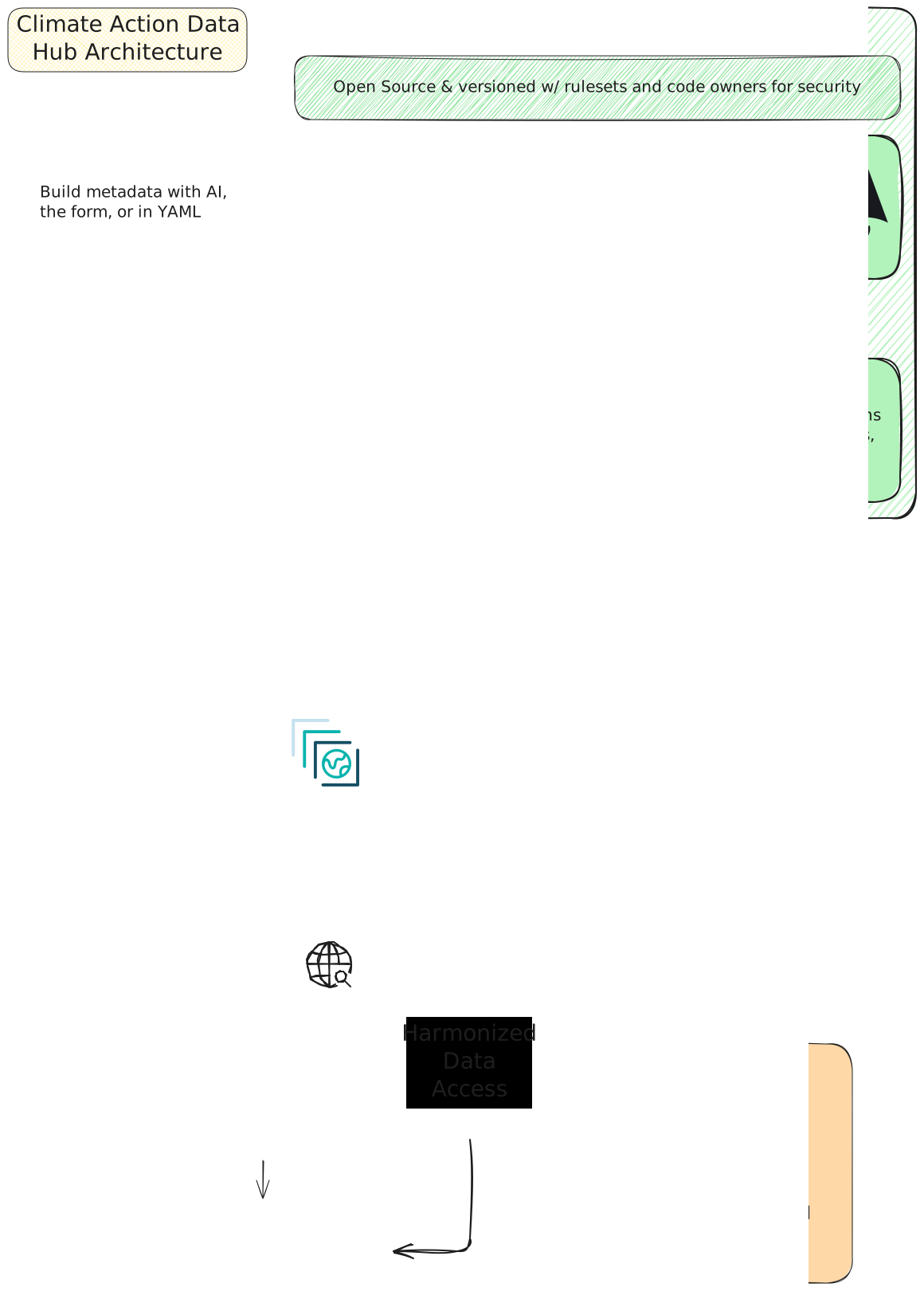
The Climate Action Data Hub was designed with the core aims of being modular, sustainable, open, and built on modern technologies and best practices. Everything is open source and designed to be easily copied, built on, and modified by others. The overall architecture can be split into multiple individual components:
- The metadata standard
- The metadata catalog
- The website
- The AI Skills
- And, of course, the data itself
This page describes these different components, how they fit together, and why the design choices were made.
These components are maintained in separate repositories so they can be used and developed independently. For example, the metadata standard can be adopted without using the catalog or website. The catalog can be explored through the website or accessed directly by other tools and applications. If these were all grouped together, these usage patterns would be much less explicit and development and maintenance would be much more complex. This approach keeps things simple, easy to navigate, and flexible.
Architecture Overview
General Conventions
Version Control and Review
The Hub’s code is open source and licensed for reuse. Changes are version-controlled with Git and reviewed through GitHub pull requests. Conventional Commits provide a consistent way to describe changes, while pull requests document their purpose, expected behavior, and allow additional reviews and quality checks. Repository permissions, branch rules, and code ownership establish review responsibilities and control how changes are approved and merged. These steps and rules are in place to ensure that the Hub is a reliable source of information and data and keeps code maintainable for long-term sustainability. The Hub uses automated checks through GitHub Actions to help identify problems early and assist in human review.
AI-Assisted Development
The Hub uses AI tools to prototype ideas, develop features, and speed up development. These tools allow The Hub to respond to feedback and deliver improvements faster and with fewer resources. However, the use of AI is guided by the need to keep the Hub usable and maintainable beyond its initial development team and funding period, as a high-quality product. Therefore, AI-assisted contributions follow the same quality and review requirements as other contributions.
Contributors are responsible for understanding the generated code they submit, checking its behavior, and ensuring it follows the repository’s conventions. Accepting generated code solely because it appears to work is insufficient for production use, and passing automated tests alone does not establish correctness or maintainability.
AI tools assist with implementation, debugging, documentation, and review, while human contributors remain accountable for design decisions, scientific correctness, and long-term maintainability. This development prioritizes small, focused changes and documentation that is readable and understandable to other developers. Existing development patterns are reused where appropriate and documentation and comments explain decisions and assumptions that future maintainers need to understand.
Repository-level AGENTS.md instructions, development skills, and access to
relevant documentation through MCP servers help coding agents follow project
conventions. Automated checks, linters, and human code review provide additional
quality controls.
The metadata standard
A Hub record exists to make a resource discoverable, understandable without opening the underlying files, citable, validatable against a schema, and usable without manual interpretation. The Hub needed a standard that was easy to author, AI agent-ready, easy to validate, easy to render site pages from, and flexible enough to cover different data formats, tools and platforms, reports, and other resources. Many fantastic community formats exist (i.e., STAC, OGC API Records, DataPackage, etc.), but none are generic enough to cover all the Hub’s needs without some pros and cons. The Hub did not want to reinvent the wheel, so rather than trying to create a new metadata standard from scratch, it designed a standard ‘Authoring Format’ that was specifically designed to be mapped to existing community formats - similar to and inspired by pygeometa or portolan. Hub records allow one authoring format which can then be converted into widespread community formats for downstream use and publishing - Geospatial records become STAC, Tabular records become Frictionless DataPackages, etc.
The standard is deliberately generic underneath the CGIAR and Climate Action -specific parts: a project outside the Hub can adopt just the core schema, or compose its own extensions on top, without inheriting any Hub policy.
Design and validation model
The standard is intended to be written as YAML to make it easier to author and more human-readable. It can then be validated using JSON schema, which also provides autocomplete, descriptions, examples, and useful error messages. This also makes the metadata easier to author for AI agents as they can read the schema and validate their work as they go.
The metadata standard publishes a core JSON Schema plus a Hub profile that
requires three Hub-maintained extensions: cdh, climate, agriculture. It
was designed this way to allow outside projects to easily reuse the core fields,
and add custom extensions for additional fields as needed. This will allow them
to use much of the tooling the Hub has built for its needs without needing to
adopt fields which may not be relevant to them or cover their needs.
The Hub has adopted the RFC 2119
requirement levels (Required/Recommended/Conditional/Optional) for each field in
the standard, and the schema + some additional validation rules enforce them.
Validation itself has two independent layers: a mechanism check (core plus
exactly the extensions a record declares in extensions[] — fields from an
undeclared extension are rejected outright) and a profile check (policy on
top, such as the CDH profile’s requirement that every record carry the cdh
extension). That split is what lets an outside adopter reuse the mechanism
without adopting CGIAR’s policy. The core required fields of id, title,
description, resource_type, cdh.domain, keywords, license, a
licensor contact, citation, and data address “can someone find,
understand, cite, and access this,” with other sections optional until it
applies.
Controlled vocabularies (vocab/domain.json, commodity.json,
geography.json) constrain the closed-vocabulary fields for easier filtering
and linking to external vocabularies, such as AgroVOC and UN M49 geographies.
These links improve machine interpretability and interoperability across
datasets and tools.
Along with controlled vocabularies, the Hub adopted multiple fields directly
from STAC and other standards and provides mapping files within the standard
repo to translate between the Hub fields and these community fields. For STAC,
the Hub includes which STAC extensions apply (Datacube, Table, Raster,
Classification, Version, …), and explicit rules for when a fact belongs on the
Collection, an Item, a summaries entry, or an Asset. The Hub is currently
working on Python tooling to easily convert from Hub metadata records to STAC,
and will add additional community standards in the future.
Other fields were chosen specifically to help guide users, both human and AI
agents, improving interpretation resulting in more robust workflows. These
fields, such as note and not_recommended_for are intended to guide the user
away from common pitfalls, biases, and misusages. These can be used to direct
users to alternate data sources for their needs, explain dataset directionality,
and provide additional warnings and guidance in how a dataset is intended to be
used.
The
glw4-2020 record
is a good illustration of the standard: a note field carries the projection
caveat that would otherwise mislead anyone doing area-based analysis, keywords
mixes plain search terms with a linked AGROVOC concept, and contact entries
carry distinct roles (licensor, producer, processor, point-of-contact)
rather than one undifferentiated author list.
Additional Metadata Tooling
To assist in authoring and publishing records, the Hub has developed multiple tools. For users familiar with AI agents and data workflows, the Hub provides an AI agent Skill to help author and fill in the metadata fields for new datasets. This skill allows the Agent to fill in fields automatically based on the actual data file (e.g., the bounding box, data type, column/layer names, etc). It then works with the user to fill in the remaining fields and validates the record to catch any errors. More about AI skills and why the Hub uses them can be found in the Skills section of this document, and on the Skills Github.
For users who prefer a more manual workflow, but don’t want to hand-write YAML in a code editor, the Hub provides a simple form-based workflow in the Metadata Submission App. This is a lightweight and static web app that allows users to create a new record or upload an existing one for easier editing. The form includes autocomplete, field descriptions, and immediate validation against the standard, so errors can be caught immediately. The app also has a built-in AI agent which can assist in filling in some of the metadata fields, and it can be activated by providing a free API key. This app is also intended to simplify the submission process, and it allows users to open a request to add the record directly in the Hub Catalog with minimal technical knowledge.
The Hub is also developing a Python package for working with the standard at
cdh-metadata-tools.
This Python package is inspired by
pygeometa and will provide tools and
functions to read, write, and validate records, while also providing the
interface to convert records to STAC, OGC API Records, Datapackage, and other
community metadata formats. io.py reads the raw authoring YAML, model.py
parses it into a typed CDHRecord, and a small registry of pluggable output
schemas (STACOutputSchema, OGCRecordsOutputSchema) encodes that typed record
into the target format - metadata-tools generate --schema stac It is intended
to be wired into the CI systems of the Hub, publishing records in the Hub STAC
Catalog and other systems as they are submitted.
Publishing and versioning
All changes to the standard are tracked in a changelog following the Keep A Changelog Conventions and releases use Semantic Versioning.
The standard, its schemas, vocabularies, and extensions all share one version
tag. Each release publishes the schemas, vocabs, and extension definitions to a
versioned URL (<tag>/schemas/…) on GitHub Pages, plus an unversioned mirror of
the vocabularies so themes[].scheme URIs stay stable across releases. A
record’s cdh_schema_version identifies the release against which it should be
validated. Published release artifacts and their validation dependencies remain
fixed, allowing existing records to continue validating against their declared
version as the standard evolves. Each release also includes a versioned
Authoring Guide and Specification Document describing the metadata fields, their
definitions, and their intended use.
Published, versioned schemas support validation and integration with tools such as language servers and the metadata submission app described above. They provide a single source of truth, reducing drift between the standard and the tools that implement it. Explicit version references allow downstream tools to adopt schema changes deliberately. Changes and releases are subject to automated checks and tests to detect errors before publication and reduce the risk of breaking downstream workflows.
CDH Metadata Catalog
Hub records are recorded and published in the
CDH Catalog. The full
catalog is managed with Git and kept in a public GitHub repository, with all
accepted records merged into the main branch. This tracks submissions, review
decisions, and changes, with Git preserving the version history of published
records for transparency and future reference. The full catalog can be
downloaded or cloned, allowing others to archive, reuse, and maintain it
independently of the Hub’s website and infrastructure.
Currently there is a small number of records (including mapspam and glw4) which can be used as an example and guide for additional records.
Catalog Submission
When a new dataset and record is submitted to the Hub, an Issue or PR is opened
in this repository. This triggers multiple automated validation pipelines, and
if the record is not valid against the Hub Metadata Standard the author is
notified with a helpful error message, and the addition to the Hub is blocked
until the record is fixed. Following the automated validations, the record is
reviewed by a member of the Hub team. This review is used to check the metadata
for understanding and completeness against the standard, and allows the team to
fill in and edit any fields that are missing or unclear. It also allows the team
to determine the dataset’s suitability for the Hub - some records may be
rejected if they are not appropriate, out of date, or not related to the aims of
the Hub. Following review and approval, the record is then merged to the main
branch. This step is critical to ensure that the Hub provides consistent,
useful, and scientifically robust data and metadata. This also adds an
additional safety step by forcing all records to be independently reviewed,
validated, and approved before they are published.
Catalog Publication
A submitted record is published when it is merged into the main branch. This triggers workflows that update downstream products.
A GitHub Actions workflow sends a repository_dispatch event to trigger the build pipeline, rebuilding the Hub website with the updated catalog through the build pipeline. This allows the catalog to remain as the canonical source of metadata records, while automated builds keep the website aligned with it and reduce the need for manual updates.
An additional workflow, currently under development, will use the cdh-metadata-tools package to convert records into STAC and other community formats and publish them to cloud storage for distribution and usage.
Data storage and distribution
The Hub is designed to be a federated, cloud-native data platform. Datasets can be hosted in Hub-managed cloud storage or remain with external providers, while being discoverable and accessible through the same catalog. This approach reduces unnecessary duplication of data that are already openly and easily accessible. Shared metadata provides a consistent interface for users, applications, and AI agents to discover, interpret, and access datasets across providers, and allows users and producers to work with datasets through their preferred tools and workflows.
The Hub prioritizes open data and supports the Accessible principle of FAIR by promoting documented, machine-accessible links to data and metadata. The independently maintained catalog also supports the preservation of metadata when source datasets become unavailable. All data in the Hub must carry a license and usage restrictions must be explicitly documented.
Beyond discoverability and access, the Hub aims to make large datasets practical to use. Cloud-optimized formats such as Cloud Optimized GeoTIFF (COG), Zarr, and Parquet allow applications to retrieve relevant portions of datasets without downloading them in full. This can reduce bandwidth, local storage, and computational requirements, lowering barriers to scientific analysis and machine learning, particularly for users with limited connectivity or computing resources.
Hub Data Storage and Processing
Where datasets are already available from reliable providers with suitable access methods, the Hub prioritizes cataloging and linking to those existing assets. Where access is limited by file formats, download requirements, or hosting arrangements, the Hub can process and host a copy to improve usability, subject to the source license.
Any Hub-produced versions retain clear links to the original dataset and document the processing applied, including changes to format. This helps users distinguish source data from derived products, assess their suitability, and reproduce the processing where needed.
To support the preparation of analysis-ready, cloud-optimized (ARCO) datasets, the Hub provides a Python package and a data pipeline which can be used to process and publish datasets. The CDH Data Pipeline repository contains the package and dataset-specific “recipes” that define how source data are retrieved, processed, and published for the Hub. This is inspired by Pangeo Forge and makes dataset preparation repeatable and transparent. Version-controlled recipes document the processing steps, allowing others to inspect, reproduce, and adapt the workflows for their own use.
Together, these practices support FAIR data reusability by preserving attribution, licensing, and provenance alongside improved access.
Hub-managed datasets are stored across multiple cloud providers, depending on dataset size, access requirements, and hosting agreements. The Hub primarily uses Cloudflare R2, whose absence of data egress fees helps sustain access to large climate datasets without high download-related costs for the Hub. Selected datasets are also hosted on Amazon S3, with the aim of publishing specific high-impact datasets directly through the AWS Data For Good catalog.
Regardless of storage location, datasets are described through the same catalog, providing consistent discovery and access information across providers.
The Hub website
The Hub website provides an easy-to-navigate interface for discovering datasets and understanding their potential uses and limitations. It also brings together dataset tutorials and code examples, wikis on data and climate analysis, and information about the Hub’s mission and how to contribute. Dataset information is drawn from the Hub Catalog, which remains the canonical source of metadata records.
Static Architecture
The website is built as a static site: pages are generated during the build process and served as HTML, CSS, and JavaScript. Static generation suits the Hub because catalog content changes through reviewed submissions and releases. Pages are rebuilt when those changes are published and then served directly to visitors, without requiring an application server or database to operate and maintain.
Dataset metadata are included directly in the generated HTML, making them accessible to search engines and automated clients without requiring JavaScript execution to retrieve the core content. This supports FAIR findability by exposing catalog information through individually addressable web pages.
This architecture reduces hosting costs, operational complexity, and ongoing maintenance requirements, as minimal infrastructure is needed to operate the website. It also improves security as there are no server or database endpoints which could be exploited. Once deployed, the published pages remain available independently of the systems used to build them.
Static hosting also improves operational resilience. Serving published pages requires no application process or database that could crash, become overloaded, or lose connectivity. Problems with source repositories or the build pipeline can delay updates without interrupting access to the existing website. Hosting and network outages remain possible, but fewer runtime dependencies reduce the ways the website can become unavailable to users.
These characteristics support the Hub’s long-term sustainability. Services such as GitHub Pages and Cloudflare Pages offer free hosting options for static websites, reducing dependence on continued project funding. The generated files can be copied, archived, or transferred to another hosting provider, while the source code and build configuration allow others to clone the repository, rebuild the site, and publish their own copy. Together, these options support continued access to the published catalog and documentation even if the original Hub deployment is discontinued.
Website Tech Stack
Astro
The website uses Astro, a framework well-suited to static content and documentation websites. Astro generates pages from Markdown and structured data such as YAML, simplifying authoring of content and integration with the Hub Catalog. Astro uses an HTML-first approach that limits JavaScript to interactive features such as search, filtering, and maps. This allows a modern user experience while keeping the website lightweight, fast, and readable, particularly benefiting users with limited bandwidth or computing resources.
The site uses multiple plugins to add functionality, including Sätteri for fast and efficient markdown rendering, Shiki for syntax highlighting, and astro-pagefind for client-side search. These limit the number of tech components the site needs to hand-build and maintain, while keeping the dependencies limited to widely-used community packages.
Code Maintenance
The website uses TypeScript for static type checking and Biome for linting and consistent code formatting. These tools help catch common errors early, reduce inconsistencies, and make the codebase easier to review and maintain. Astro’s own checks complement them by validating types and identifying issues in .astro components.
Build pipeline
The Hub website leverages GitHub Actions to build and deploy the production site to GitHub Pages. It can also be built locally in a compatible JavaScript environment, and the generated static files can be deployed to other hosting platforms (e.g., Cloudflare Pages). GitHub Pages was chosen as an initial host due to its ease of setup; however, Cloudflare Pages may be used in the future to provide greater control and features supporting AI agents. The static architecture allows the website to move between providers with minimal changes.
During each build, the website fetches catalog records and agent skills directly from their respective repositories. This keeps those two standalone products as the source of truth, preventing drift and reducing maintenance overhead. Environment variables allow developers to use local directories, select different branches, or point to alternative repositories to build a custom catalog. Local content examples also support development without fetching the full catalog, which is useful where connectivity is limited.
The production build is triggered on every applicable update to the main branch of the catalog repository, the skills repository, or the website repository. This ensures that the website always shows the most up-to-date content submitted to the Hub. The build process installs dependencies using the lockfile, retrieves source content, and validates it against the website’s content schemas. These checks cover catalog records, skills, tutorials, wikis, FAQs, and other content collections. Malformed metadata, code issues, bad dependencies, missing required fields, or incorrect types cause the build to fail. A failed catalog fetch or an empty catalog also stops the build, helping prevent an upstream outage or configuration error from publishing an empty catalog. Deployment runs only after the validation and build completes successfully. If the build fails, the existing production site remains available.
This design keeps the website up-to-date with the latest content through automated rebuilds, while ownership and control remain with each source repository. Validation checks and deployment safeguards reduce the risk of publishing invalid content or a downstream failure causing a production outage.
Design Principles and Modern Standards
The Hub website prioritizes accessibility, discoverability, and efficient access for people and automated tools. These goals complement the Hub’s FAIR data practices by helping users find, understand, and access its published resources.
Accessibility
To ensure the Hub is accessible to all users, the website has a strict target score of 100 in Lighthouse’s accessibility audits for tested pages. Any changes to the codebase are unable to be merged unless they pass this check. This checks for descriptive links, alternative text for informative images, sufficient color contrast, keyboard navigation, and visible focus indicators, among others. Native HTML controls are preferred, with ARIA labels, roles, and states added where needed to communicate interactive behavior to assistive technologies. These automated checks cover only a subset of accessibility requirements and are supplemented by manual testing and review.
Performance and SEO
The website prioritizes lightweight pages, limited JavaScript, optimized images, and responsive layouts to support users across devices and connection speeds. Descriptive page titles, Schema.org structured metadata, sitemaps, and crawlable links help search engines, crawlers, and AI agents discover and interpret its content. Dataset descriptions are available directly in HTML, with links to the underlying catalog records and data assets. For more about how the Hub website is built for use by AI agents, see Agent Readiness below. Together, these practices support fast page delivery and make the Hub’s resources easier to discover and access.
Alongside accessibility checks, the repository runs Lighthouse performance and SEO audits on each pull request to identify regressions and opportunities for improvement before changes are merged.
Agent Readiness
The Hub recognizes that AI is rapidly changing how people access information and is designed to support both people and AI agents. Alongside standard HTML pages, the Hub generates Markdown and JSON representations at build time to support different access needs. These share the same source content, reducing duplication and keeping the human- and machine-readable versions aligned.
Eligible wiki, tutorial, and dataset pages are available as Markdown at
Pages also include Schema.org metadata to support discovery by search engines
and automated tools. A catalog.json publishes the full catalog as a Schema.org
DataCatalog, while a /catalog/<id>.json provides each record’s metadata. A
directory at /.well-known/api-catalog points agents to the available
endpoints. These are based on up-and-coming and already established standards
for modern access patterns. In compatible browsers, WebMCP tools allow agents to
search the catalog, retrieve records, and list available agent skills.
Cloudflare’s Agent Readiness assessment helps identify opportunities to improve automated discovery and access, with recommendations assessed against the Hub’s needs and hosting capabilities. The current interfaces and agent skills are documented on AI and agent access.
Agent skills
Introduction
Across the institutions that make up CGIAR, researchers spend much of their time on the same kinds of tasks: downloading datasets, defining methodologies, running analytical protocols, and assembling information for their studies. In practice, each center tends to rebuild these processes on its own — the same workflow reinvented in a dozen places, with little that can be handed off or reused across institutions. The aim of this work is to change that: to capture each process once, in a form that is reproducible and easy to share, so that both the data and the methods behind it can be picked up and reused by another institution with as little friction as possible.
Simplifying geospatial processing
The Hub’s datasets are cloud-native and machine-readable, yet turning them into a usable result still demands knowledge that most researchers don’t carry day to day: which source holds which variable, how to clip a raster to an administrative boundary, which aggregation method preserves the correct units, how to compute a seasonal indicator over a spatial grid, and what fields the Hub metadata schema requires.
Standardizing workflows via AI agent skills
The agent-skills work set out to close that gap — to let a researcher state what they need in plain language and have an AI agent carry out the full workflow correctly, from raw download to a shareable output.
A skill is a set of instructions that tells an agent how to accomplish a specific goal: what to ask the user, in what order to perform each step, and what a correct result looks like. Its purpose is standardization. Instead of every conversation reinventing how a task is done, the same procedure runs the same way each time — regardless of who is asking or which agent is executing it.
In practice, each skill is a plain-text SKILL.md file: YAML frontmatter that tells the agent when to trigger the skill, followed by Markdown instructions describing the workflow. Optional folders can bundle helper scripts, reference documents, and templates alongside it.
Why AI agent skills?
The Hub considered other ways to deliver these workflows. A bespoke chatbot would need its own server, authentication stack, and ongoing maintenance, and would be tied to a single AI provider. A custom API wrapper would remove some of that burden but would still leave the user writing code to call it. Agent skills take a different approach. Because a skill is just an open-format text file, any compatible assistant can load and follow it — Claude Code, OpenAI Codex, and Antigravity all read the same skill folder. Each workflow is therefore published once and works everywhere, with no server to operate and no vendor lock-in.
Supporting Multi-Modal execution personas
The workflows were designed with two kinds of users in mind. The first is comfortable with programming and with AI agents, and wants direct, scriptable control; the second needs to reach a result quickly using only plain-language prompts, without touching code. For the first profile, the Hub documented use through the terminal with Claude Code. For the second, the Hub relied on more guided, GUI-driven agents such as Antigravity or Codex. In every case the end-user experience is the same: describe what you need in one sentence, confirm the proposed plan, and receive a ready to use output.
Methodology
Skills creation
Each skill was built and iterated using Anthropic’s
skill-creator — an open meta-skill that
interviews you about the task, drafts a SKILL.md, proposes test prompts, runs
them in parallel (with skill enabled vs. without), and shows outputs
side-by-side with pass rates. The loop is: describe the task → review the draft
→ run evals → leave feedback → skill-creator rewrites and re-runs — until pass
rates are satisfactory. This process keeps skill writing grounded in observed
agent behavior rather than intuition about what instructions should work.
Repository structure
Skills live in the .agents/skills/ folder of the skills repository, one
subfolder per skill, each holding a required SKILL.md plus whatever
references/, evals/, or assets/ that skill needs:
skills/
├── skills.json                    # index: skill name → SKILL.md path
├── skills-lock.json               # content hash per skill, checked before install/update
├── .agents/
│   ├── AGENTS.md                  # repo-level agent instructions
│   ├── mcp_config.json
│   └── skills/
│       ├── climate-data-download/
│       │   ├── SKILL.md
│       │   └── references/
Every skill folder is self-contained and independently loadable — an agent only needs the one subfolder its plan resolves to, not the whole repo — which is what lets a foundational skill be updated without touching the orchestrators that call it.
Underlying Python packages
Most foundational skills are conversational wrappers around two Python packages
— aggeodata for data
acquisition and
ag-cube-cm for crop
model orchestration — described in Python packages below. A
skill’s job is to collect parameters, confirm a plan, and hand off to the
package; the package does the actual download, processing, or simulation.
Design pattern: foundational skills + orchestrators
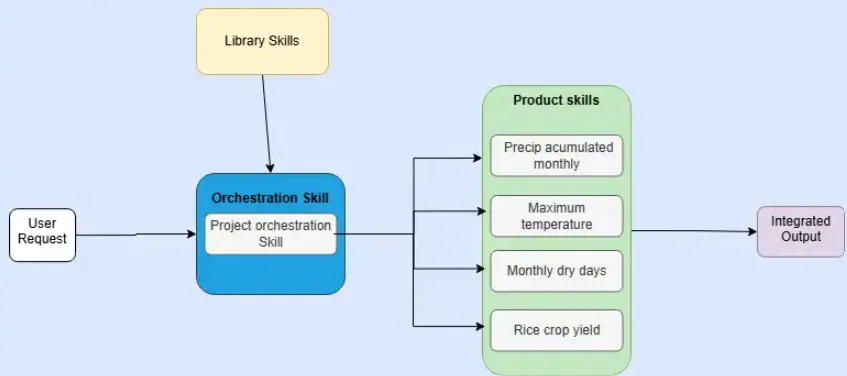
The work was decomposed into single-responsibility foundational skills, each owning one well-defined task. Orchestrator skills sit on top: they collect parameters, confirm a plan with the researcher, then delegate each stage to the relevant foundational skill rather than re-implementing it. Any foundational skill can therefore be used alone or updated without touching the orchestrators.
Results
Scoping
These are the skills that were developed to be used across different use cases; the idea is that when multiple projects share similar activities, those processes can be standardized into common steps.
This is an initial set that will expand following CGIAR project requirements.
The foundational skills developed so far are:
Data acquisition
| Skill | What it does |
|---|---|
climate-data-download |
Routes each variable to its authoritative source (CHIRPS, CHIRTS-ERA5, NASA POWER, AgERA5), shows a plan, and fetches in sequence |
soil-data-download |
Downloads SoilGrids global soil property rasters (clay, sand, silt, bulk density, organic carbon, pH) and stacks them into a validated NetCDF soil datacube |
Spatial processing and visualization
| Skill | What it does |
|---|---|
geospatial-cube-processor |
Clips rasters to admin boundaries (GADM), stacks multi-source datasets onto a common grid, computes zonal statistics, exports Cloud Optimized GeoTIFFs |
notebook-plots |
Inserts interactive Plotly chart cells into an existing Jupyter notebook; exports a standalone Plotly HTML file alongside it |
climate-dashboard |
Builds a self-contained Chart.js HTML dashboard — KPI cards, filters, sortable table — that opens in any browser with no server |
sciplot-skill |
Generates publication-ready matplotlib figures meeting the typography and resolution standards of high-impact journals (Nature, Science, Cell) |
Hub utilities
| Skill | What it does |
|---|---|
cdh-metadata |
Inspects a geospatial dataset, asks for fields it cannot derive automatically, and writes a valid CDH YAML metadata record ready for submission to the catalog |
So far, only two use cases have been considered: GCF and AgWISE. These skills are likely to be reused across other projects too, since climate information is required well beyond either of them — that reuse is the whole point of building foundational skills.
Use cases
GCF climate data access
Green Climate Fund (GCF) proposals need a defensible climate rationale —
grounded in subnational climate and agricultural data — to justify the case for
funding. Producing that evidence today is slow and manual: sourcing the right
variables per country, clipping them to the right boundary, and assembling the
tables a Concept Note or Funding Proposal expects. The gcf-pipeline
orchestrator automates that data-gathering step, so a proposal writer states
what they need and gets back ready-to-use tables, rasters, and figures instead
of raw downloads.
The gcf-pipeline orchestrator enforces six explicit gates, so no stage runs
before the researcher has approved the plan:
- Collect parameters — country, variables, date range, output folder, admin level, aggregation method, temporal frequency
- Confirm plan — the agent shows exactly what will be downloaded and how it will be processed; nothing moves until the researcher approves
- Download — delegates to
climate-data-download, which fetches the required NetCDF files - Process — delegates to
geospatial-cube-processor, which clips, aggregates, and exports a CSV and COG per variable - Visualize — delegates to
notebook-plotsandclimate-dashboardin parallel; both outputs are produced by default - Summary — lists every output path and its size
The confirmation gate at step 2 is the most important: it surfaces mis-routing (wrong variable, wrong boundary level) before a long download begins rather than after.
AgWise spatial crop modeling
AgWise is a CGIAR framework that turns field-trial, market, topography, climate,
and soil data into tailored agronomic recommendations — fertilizer rates,
planting dates, cultivar choice — for partners across Africa. Its fertilization
module depends on process-based crop model simulations, which need
high-resolution climate and soil data run pixel-by-pixel across a region. The
spatial-crop-modeler orchestrator closes that gap, driving the aggeodata and
ag-cube-cm packages end-to-end so the fertilization module always has current,
validated yield inputs.
The spatial-crop-modeler orchestrator runs DSSAT pixel-by-pixel over a spatial
domain, combining climate and soil datacubes into a yield map. Its first design
decision is a mode question: whether the datacubes already exist on disk
(with_cubes) or need to be downloaded and assembled first (full_pipeline).
Skipping unnecessary downloads when the user already has the data is the main
reason the mode exists — the simulation itself is identical in both cases.
Before collecting any parameters the skill runs a silent environment check,
verifying that ag-cube-cm, aggeodata, and mcp are all importable. If any
are missing it stops and shows the exact install command. This prevents the
common failure of reaching step 5 only to discover the simulation tool was never
installed.
The eight gates in full_pipeline mode:
- Environment check — silently verifies
ag-cube-cm,aggeodata, andmcpare installed; stops with the install command if any are missing - Collect parameters — bounding box, date range, crop name, cultivar code,
planting date, output directory; for
full_pipelinealso climate sources and a suffix label for file naming - Confirm plan — shows mode, area, period, climate and soil sources, crop, planting date, and output path in a single table; no files are written until the researcher approves
- Generate YAML config — writes the
ag-cube-cmconfig file; flags anyworking_paththat contains spaces (DSSAT is a Fortran program that fails silently on space-containing paths) - Validate config — runs
ag-cube-cm validateand resolves any errors before touching data - Run simulation — runs
ag-cube-cm run; forfull_pipelinethis downloads climate viaclimate-data-download, builds the weather datacube, delegates soil download tosoil-data-download, then runs DSSAT across every pixel; intermediate files are cached so re-runs skip completed steps - Quality gate — mandatory before any visualization; checks three
thresholds: at least 20 % of pixels succeeded (
flag=0), fewer than 50 % failed (flag=1), and mean harvest yield (HWAM) above 200 kg/ha; a clean exit code from DSSAT is not a quality signal — the gate exists becauseag-cube-cmexits cleanly even when the entire domain is over water or the planting season is wrong; if any threshold fails the skill halts, surfaces the pixel summary, and diagnoses before proceeding - Visualize — only after the quality gate passes; delegates to
notebook-plotsandclimate-dashboardfor the yield map and summary figures
The quality gate at step 7 is the sharpest difference from the GCF pipeline. Because DSSAT’s exit code does not distinguish a successful run from a run that produced no valid output, a mandatory programmatic check is the only reliable way to stop a researcher from presenting an all-NaN yield map as results.
How to use these skills
Which interface fits depends on the persona described in the introduction — the workflow underneath is identical either way; only the surface changes.
Technical users run skills directly from a terminal-based agent (Claude Code, OpenAI Codex) with the skills repository already configured. A single natural-language request is enough; the agent resolves it to a skill, confirms a plan, and executes:
You:   Simulate maize yield potential in Mwanza district, Malawi, 2010–2012,
       planting 2010-11-01, 4 windows, no fertilizer, 8 cores.

Agent: [resolves the request to spatial-crop-modeler]
       → checks ag-cube-cm and aggeodata are installed
       → shows the plan — area, period, crop, sources — for approval
       → runs the pipeline, reports mean yield and output paths
Non-technical users — proposal writers, partners, anyone without a
development environment set up — go through a GUI-based agent (Antigravity) that
follows the same SKILL.md workflow with no command line involved. The prompt
is just as plain; there’s no terminal, no install step, no code to read:
You:   I need rainfall and temperature data for Togo, 2015–2023, by
       district, for a GCF proposal.

Agent: [resolves the request to gcf-pipeline]
       → shows the same plan a terminal user would see, in the chat window
       → delivers a CSV, a COG per variable, and a dashboard link
Both routes run the same skill and produce the same output — only how the plan is confirmed and the result is handed back changes. See Publishing and discovery below for how each interface is installed.
Publishing and discovery
Skills live in
github.com/CGIAR-Climate-Data-Hub/skills,
separate from the site source. The Hub fetches them at build time via the
skills() Astro loader (src/lib/skills.ts), using the same mechanism as the
catalog fetch from cdh-catalog. A skills.json index at the repo root maps
each skill name to its SKILL.md path; agents resolve that index and verify the
content hash recorded in their local skills-lock.json before installing or
updating, so researchers always run the version they checked.
The repository also ships deployment guides for Antigravity and OpenAI Codex alongside the Claude Code guide, so the full pipeline is accessible to researchers who do not have a paid Claude subscription.
Python packages
Two open-source Python packages do the heavy lifting behind the foundational skills — each skill is a thin conversational wrapper around one of them, and both can be used directly, without an AI agent, by anyone comfortable scripting the workflow.
aggeodata
aggeodata handles data
acquisition: it downloads daily gridded climate data from CHIRPS, CHIRTS,
AgERA5, and NASA POWER, and static soil properties from SoilGrids, then
assembles them into analysis-ready NetCDF datacubes aligned to a common grid and
CRS. A YAML-driven pipeline (run_download → run_datacube) covers the common
case; each source also has a standalone downloader for one-off use.
ag-cube-cm
ag-cube-cm is the
crop-modeling layer: it takes the datacubes aggeodata builds and runs a
process-based crop model — DSSAT, CAF2021, SIMPLE, or the pure-Python Banana-N
model — pixel-by-pixel across the domain in parallel, producing a gridded yield
map (kg/ha) across planting windows, years, and space. It performs no downloads
of its own. Both packages ship an MCP server, so an AI agent can drive the same
two-step workflow the spatial-crop-modeler skill uses.
How to cite
Andres Aguilar, Diego Agudelo, Brayden Youngberg (2026-09-14) Data Hub Architecture. CGIAR Climate Action Data Hub. https://cgiar-climate-data-hub.github.io/wikis/architecture/
BibTeX
@misc{architecture_2026,
  title     = {Data Hub Architecture},
  author    = {Andres Aguilar and Diego Agudelo and Brayden Youngberg},
  year      = {2026},
  publisher = {CGIAR Climate Action Data Hub},
  url       = {https://cgiar-climate-data-hub.github.io/wikis/architecture/}
}